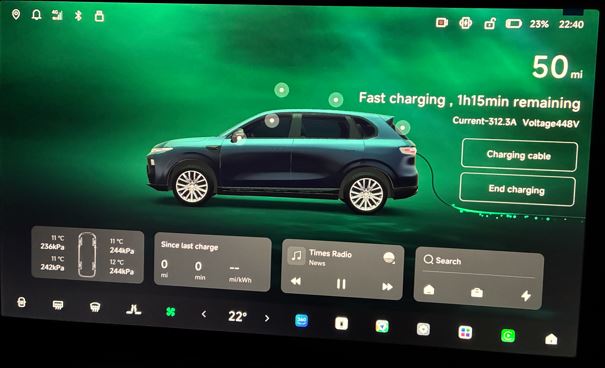
I’m trying to get a proper understanding of how charging the B10 works at Tesla Superchargers that are open to non-Tesla cars.
I haven’t tried it myself yet, and before going I’d like to avoid turning up at the charger without knowing what to do. From what I’ve gathered, you need to use the Tesla app, select the compatible station and start the charging from there, but I’d be interested in hearing from anyone with a B10 who’s already done a real test.
In particular, I’d like to understand:
whether the cable reaches the B10’s socket comfortably
whether starting from the app is immediate or causes any issues
what charging power you’ve seen
whether there are any practical differences compared to standard HPC chargers
If anyone has already charged at a Supercharger with the B10, it’d be really useful to know how it went in practice.
Hi! Don’t worry at all, the compatibility between the B10 and Tesla Superchargers open to third parties is complete, but there are a couple of practical “tricks” worth knowing before you get there so you don’t find yourself in difficulty.
Here are the actual details on the 4 points you asked about:
1. Position of the socket and cable length (The critical point)
The Leapmotor B10 has its charging flap on the rear right side (passenger side).
At V3 Superchargers (the most common ones): The cable is notoriously quite short. Since Teslas have their socket at the rear left, to reach it comfortably with the B10 you’ll need to park in the bay to the right of the post (effectively taking the “wrong” bay relative to the post number) or park very close and slightly off-centre. Don’t worry, owners of other makes all do this, but if the Supercharger is very busy it might get a bit awkward with the bay “occupied at an angle”.
At V4 Superchargers (the newest ones, with the large white arch): The cable is considerably longer and reaches comfortably without any acrobatics or awkward positioning.
2. Starting via the Tesla app
The process is immediate, provided you do things in the right order:
Download the Tesla app and set up a payment method before you arrive.
When you’re at the post, open the app, tap on “Charge your non-Tesla” and select the station you’re at on the map.
Connect the CCS cable to the B10.
In the app, select the connector number (printed at the base of the post) and do a “swipe” to start. The handshake (the initial dialogue between post and car) takes about 10–15 seconds, then it starts smoothly.
3. Real charging speeds
This depends on which version of the B10 you have, but the 400V platform performs really well:
If you have the version with the 56.2 kWh battery, you’ll see a maximum peak of around 140 kW in ideal conditions (battery flat at around 15–20% and already warm).
If you have the 67.1 kWh version, the maximum peak rises to 168 kW. As these are LFP chemistry batteries, the curve is fairly consistent: expect the classic 30% – 80% in around 20–25 minutes.
4. Practical differences compared with normal HPC posts (FreeToX, Ionity, Ewiva)
No screen or RFID card: At the Supercharger you can’t tap your provider’s card (e.g. Enel X, A2A, etc.) and there’s no display on the post. You do everything and see everything (including real-time tariffs) only in the Tesla app.
Variable prices: Tesla often changes tariffs depending on the time of day (Peak and Off-Peak bands). Usually, if you don’t have the Tesla monthly subscription (which costs around €10 a month but lowers the per-kWh rate to match that of Tesla customers), “spot” charging as a non-Tesla is a bit more expensive than other operators if you don’t use third-party packages or subscriptions.
Reliability: Compared with other HPC networks that occasionally play up with their software, Superchargers in terms of starting up and power stability are absolute Swiss watches.
In short: the first time, try to go at a time when it’s not completely busy, so you can get the measure of the short Supercharger cable without rushing. Otherwise, the experience is among the very best!
I’ll add that if you reverse in, you should be able to put the B10’s charging flap in the middle of the post because the cable is short but above all Teslas charge from the opposite side
MagMa provided a comprehensive answer. I have done one public DC charging so far, and it was on a Tesla Supercharger at off-peak rates (v4 I think). No issues. The B10 manage to pull 140kw:
Everything as MagMa explained, I did a 420 km round trip. I had to set off with a full tank and top up on both the outward and return journeys. I made two charges that gave me the peace of mind of not being left stranded. Both at Tesla Superchargers, and here are the figures:
outward: 9 minutes and 20 seconds, charge of 22.85 kW, 33%, speed 146 kW/h;
return: 8 minutes and 9 seconds, charge of 20.86 kW, 29%, speed 156 kW/h.
Finding the charging point takes longer if you don’t already know the place, since they’re never on the motorway route. Bear in mind that not all Tesla Superchargers are available to everyone, but the app will only show you the ones you can actually use. Absolutely brilliant
No, Tesla’s one. When you sign up it asks you what car you have and therefore if you don’t have a Tesla it only shows you the ones you’ll be able to charge at.